Nerd And Geek Stuff - Fixing Computer Problems

For non-sports-related posts. Because we really can't stand talking about sports!
Post Reply
User avatar
Fat Man
The Fat Man Judgeth
Posts: 3301
Joined: Fri Feb 13, 2009 5:08 am
Gender: Male
Location: El Paso, Texas, USA, 3rd Planet, Sol System, Milky Way, Local Cluster, Somewhere in The Cosmos!
Contact:

Nerd And Geek Stuff - Fixing Computer Problems

Post by Fat Man »

Recently, I bought a new 160 gigabyte hard drive for my computer and two brand new DVD Burners so I can make copies of CD ROM and DVD disks.

I have always had 2 hard drive on my computer.

Primary IDE Drives - IDE 0

C:Drive labeled (Master)
D:Drive labeled (Slave)

And my 2 optical drives, CD or DVD drives.

Secondary IDE Drives - IDE 1

E:Drive set to Master
F:Drive set to Slave

My Windows XP Professional is installed on my C:Drive, and it only has 37 gigabytes.

My second hard drive only had 30 gigabytes, so I recently bought a new 160 gigabyte hard drive to replace it.

Before removing the old hard drive I created a new folder on my Master C: Drive, and named the folder SLAVE FILES.

Then I transferred all of my files from the Slave D:Drive to the SLAVE FILES on my Master C:Drive, then I opened up my computer to take out the old Slave and put in my new Slave so that I could then transfer all the contents of my SLAVE FILE to my new 160 gigabyte Slave D: Drive.

But when I booted my computer, the icon for my second hard drive was missing.

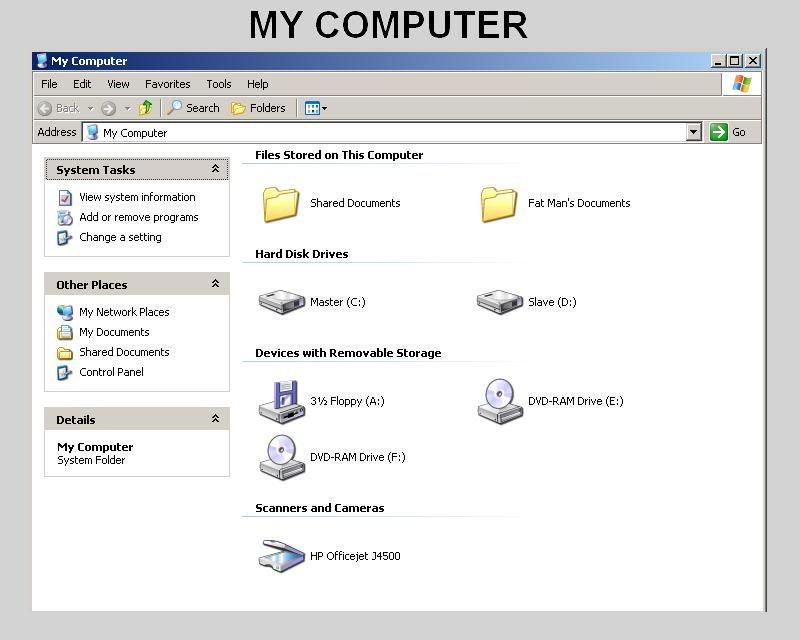
When I go to "My Computer" this is what I'm suppose to see.
Image

But the icon for the second hard drive was missing!

I had no idea as to how to fix the problem so I did a Google search and typed in [Missing Icon For Second Hard Drive] and spent over three hours typing different search parameters and going through many forums where they talked about the problem, but nobody had any solutions.

After I typed in [Second Hard Drive Not Showing Up] I finally found a web site that told me how to fix the problem.

All Experts

http://www.allexperts.com/

And the web page that specifically covered the problem I was having as at:

http://en.allexperts.com/q/Hard-Drive-P ... howing.htm

And here is the solution they offered.

Problem:

System does not show second (of two) hard drives in my computer. It is there in bios and in device manager. It has working windows drivers assigned to it but I simply can not access it through windows. It has no drive letter assigned to it nor can I find a way to assign one or format it as there is nothing to click on to get the tools up for it.

Solution:

To view missing hard disk from Computer Management.

First, Right click 'My Computer' > Manage > Disk Management.

You will see what the problem is from this view.

If it's a new hard drive, then it's probably not initialized or formatted yet.

locate hard drive that's currently unusable, right click > format.

So this is exactly what I did.
Image

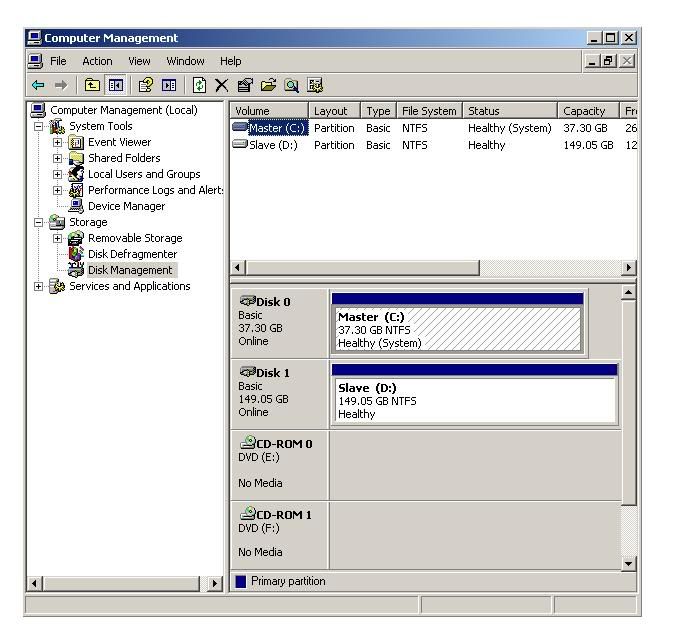
This is what my Disk Manager looks like now, but before, there was no letter designation, so I had to right click on the "unknown" drive to initialize it and to format it, and after that, when I went back to the "My Computer" window, the second hard drive showed up.

I was then able to transfer all of the files from my folder named SLAVE FILES on my Master C:Drive to my new Slave D:Drive.

But something else got screwed up.

The programs that I had on my Slave would not run. On my Slave I have two folders labeled "Program Files" and "Program Files 2" so I had to delete everything from those two folders to clean them up, and then re-install my Train Simulator back into the folder labeled "Program Files" and the rest of my favorite applications back into the folder labeled "Program Files 2" and I created another folder labeled "Program Files 3" to install my Virtual Moon Atlas.

But before I could do that, something else screwed up!

The two icons for my brand new DVD drives, Drive:E and Drive: F were missing.

I was able to to reinstall all of my other programs back into the folder "Program Files 2" and my Virtual Moon Atlas into the folder "Program Files 3" because those programs were located on my D: Drive in a folder that I labeled "Downloaded Applications" but I had to reinstall my Train Simulator from CD ROM disks, but the icons for my two DVD drives was missing.

So, again I did some more Google searches to find out how to solve the problem, typing in more search parameters such as [Download DVD Drivers For Windows XP] or [Missing Icons In My Computer] or [DVD Icon Missing] and all I got was a bunch of web site forums where people talked about the problem, but again, nobody had any solutions.

The I tried searching for web sited where I could download the missing driver for the CD or DVD devices for Windows XP, and there is a bunch of web sites where you could download programs that will scan your computer, and you can run the programs, but to fix the problem, you have to go to their web site to register the product, and get out your credit or debit card and pay about $30 dollars, then you get the registration code in your E-mail to activate the program so you can fix the problem.

Well, I said FUCK THAT!!!

After another three hours of doing Google searches, I finally found out how to fix it.

After I typed in [Missing Icons In My Computer DVD Icon Missing] on Google I came up the with web site.

MAJOR GEEKS.COM

http://forums.majorgeeks.com/index.php?

And the web page that had the solution specifically related to my prpoblem.

http://forums.majorgeeks.com/showthread.php?t=145532

How to fix missing DVD/CD drives not showing up in Windows Explorer

It is very common these days to be using Windows 2000/XP/Vista and have your CD/DVD drive stop functioning. There are various causes; from loose power or IDE cables, to broken drives, to
corrupt drivers. The latter is the most common.

Often times, someone has upgraded from a previous Operating System, or installed (incompatible) CD/DVD burning software, when this problem rears its ugly head.

The reasoning? The drivers from these type of applications are typically incompatible when you upgrade your OS. Alternately, its not unheard of them to corrupt. When these drivers do not work--they take most, if not all, of the CD/DVD drive functions with it.

It is pretty easy to identify these problems, if you check Device Manager, you will often find a '?' or '!' next to the device. Common error codes are 19, 31, 32, 39 and 41. Also, you may find that your drive disappears from My Computer altogether.

The fix sounds complicated, but we have made it easy for you.

There are two ways to do this. Manually edit the registry and remove the bad values, or simply
download a registry file and merge it with your own. We urge you to backup ALL of your data
beforehand. We will take no responsibility for data loss! Also, it is recommended to backup
your registry.

http://support.microsoft.com/kb/322756

Warning! Any CD/DVD writing software not built into Windows will need to be reinstalled after
this procedure.

First method

1. Go to start, run and type regedit.

2. Locate the key HKEY_LOCAL_MACHINE\SYSTEM\CurrentControlSet\Control\Class\{4D36E965-E325-11CE-BFC1-08002BE10318}.

3. Locate the values on the right for UpperFilters, and/or LowerFilters.

4. Remove these values, then reboot your computer. Be careful here, there are very few second chances when it comes to the registry.


Second method

1. Download these registry files. Unzip them, and then double click to merge. They will remove the offending entries. Then, reboot your computer for the changes to take effect.

http://cid-ab9de24be9af1b9f.skydrive...RegHacks/Fixes
Well, I didn't want to mess around with my registry files so I went to the second method and downloaded the proper file for any optical device which means, the CD or DVD drives.

Of course, the "patch" I downloaded and installed was for Windows XP and if you're using Windows 95 or Windows 98 or some other operating system, you have to search for the one you need for your particular operating system.

So, I found the solutions while doing Google searches, but it took several hours of searching through all the Boo Hoo Cry Baby forums where people talked about the problem, but no solutions were offered, or searching through the web sites screaming WE WANT YOUR MONEY before the problem can be fixed.

Google SUCKS!!!

Any moron can put up a Boo Hoo Cry Baby forum where people can discuss their computer problems, but nobody has any solutions.

And there are a lot of greedy money grubbing capitalists pigs with their WE WANT YOUR MONEY web sites where you have to pay through the nose before you can fix the problems.

I had to search through thousands of Boo Hoo Cry Baby Forums and thousand of WE WANT YOUR MONEY web sites.

All of that, before I found two web sites with the correct solution.

Image

Google use to be a fairly good search engine, but now, it just sucks!!!

ImageI'm fat and sassy! I love to sing & dance & stomp my feet & really rock your world!

All I want to hear from an ex-jock is "Will that be paper or plastic?" After that he can shut the fuck up!
Heah comes da judge! Heah comes da judge! Order in da court 'cuz heah comes da judge!
Image

Image
Skul
Forum Admin
Posts: 763
Joined: Tue May 30, 2006 11:33 pm
Gender: Male
Location: Glasgow, Scotland

Re: Nerd And Geek Stuff - Fixing Computer Problems

Post by Skul »

I just think it's ridiculous that there are companies out who want people to pay for a program that they are, more than likely, only going to use it once in their entire life.

I generally don't like messing around with the registry, either. I've done it manually once or twice, but I didn't enjoy screwing around with it. Slip-up and you're buggered.
Forum Rules

SportsSuck.org. Bringing you the truth... no matter how bad it hurts.

Love and Tolerance!
User avatar
Fat Man
The Fat Man Judgeth
Posts: 3301
Joined: Fri Feb 13, 2009 5:08 am
Gender: Male
Location: El Paso, Texas, USA, 3rd Planet, Sol System, Milky Way, Local Cluster, Somewhere in The Cosmos!
Contact:

Re: Nerd And Geek Stuff - Fixing Computer Problems

Post by Fat Man »

Skul wrote:I just think it's ridiculous that there are companies out who want people to pay for a program that they are, more than likely, only going to use it once in their entire life.

I generally don't like messing around with the registry, either. I've done it manually once or twice, but I didn't enjoy screwing around with it. Slip-up and you're buggered.
The only time I made changes in my registry files was when my Incredimail program screwed up on me. I would click on a new mail and all I got was a blank, and it said "No message selected" and it was so badly screwed up I couldn't read new mail at all. I could still see the old E-mails but not the new ones.

So, I un-installed my Incredimail and re-installed it again, but the problem did not go away.

Appearantly, when you un-install an application, something of it still remains in your computer like a ghost.

I then went to Google and I typed in [Uninstall Incredimail Completely] and I found this web site at:

http://www.oeupdates.com/Uninstall-remo ... iMail.html
Uninstall IncrediMail -Remove IncrediMail

To uninstall IncrediMail then all you need to do is uninstall using add/remove programs:

Go to setting > control panel > add/remove programs (windows 2000) or control panel > add or remove programs (windows XP). Select Incredimail and select remove/uninstall and follow the instructions.

To completely remove IncrediMail then complete the first stage of the removal (above) to go through the normal uninstall procedure.

Once you have done that you need to remove unneeded IncrediMail files and settings. IncrediMail stores data in three locations the User profile, programs directory and the registry. To completely remove IncrediMail you must remove the data from all three locations as follows:

IncrediMail stores user related data in the user profile in the - documents and settings\username\local settings\application data\Im folder where is the name of the user you log on as. Deleting the IM folder will delete all your IncrediMail emails, letters etc. If you want to keep them you can rename the folder to IM-old or similar

Incredimail executables etc are stored usually in c:\program files\Incredimail. Navigate to this folder and delete it.

To delete the registry keys for the IncrediMail program

Start Registry Editor (Regedt32.exe).

For each key that you need to delete, locate the key, right-click the key, and then click Delete:

Under the HKEY_CLASSES_ROOT key, delete the following keys:

\.ima
\.imf
\.imi
\.imn
\.ims
\.imw
\Applications\Impcontent.exe
\Applications\Incredimail
\Incredicontent
\Incredimessage

Under the HKEY_LOCAL_MACHINE key, delete the following keys:

Software\Classes\.imc
Software\Clients\Mail\Incredimail
Software\Elishim\Protect\Browser (remove the Incredimail value)
Software\Incredimail

Software\Microsoft\Direct3D\Most Recent Applications\ (remove the NAME value that points to Incredimail.exe)

\Microsoft\Windows\CurrentVersion\App Paths\Incredimail

Delete the HKEY_CURRENT_USER\Software\Microsoft\Windows\CurrentVersion\Explorer\
MenuOrder\Start Menu\Programs\Incredimail key.

Quit Registry Editor.

Reference http://support.microsoft.com/default.as ... -us;297069
To go to the registry editor you click on Start > Run > then type in Regedt32.exe and that takes you to the registry editor. They didn't mention how to go there, so luckily I remembered that you first click on Start and then Run and a panel comes up where you can type in what you need.

Also, my IM folder with all of my E-mails, I selected the option to move that to my Slave D: Drive instead of having it on my Master C: Drive.

Well, I did all of that, but I noticed that there were over 200 other files that started with incredi or Incredi.

I didn't touch any of those, but when I re-installed Incredimail again, I still had the same problem.

So, I uninstalled Incredimail again, followed the steps mentioned above, and this time, I also deleted the over 200 files that started with incredi or Incredi by right-clicking my mouse on each file and then clicked on Delete, and after I got rid of ALL those files, I re-installed Incredimail again.

This time it worked!

It was like installing a new application in my computer for the very first time.

Anyway, I love my Incredimail, it's really cool.

When you are typing, it sounds like a typewriter and when you press the [Enter] key, it goes "ding!" like the carriage return on a typewriter.

Then when you click on Send, your E-mail folds up into a paper airplane (sorry sports bores, there is not any setting to make it fold into a paper football) and it goes WWOOOOOOSH as the paper airplane flies away and a progress bar at the upper right-hand corner shows that your E-mail is being sent.

Incredimail also has a Notifier feature and you can have it set for every 5 minutes or any time interval you choose, and when new mail comes in, you know it right away.

There are many different notifiers to choose from. One is a butler that walks to the middle of your monitor screen and says "You have mail sir" or madam, and then after so many seconds (you choose the time interval) the butler turns and walks away.

There are many other types of notifiers to choose from with sound effects.

Also, you can set Increfimail as your default and enter every E-mail address that you're using.

I like it because it's fun to use and I know instantly when I get new mail.

It's an excellent E-mail application, as long as it's working properly, and when I did have a problem, that was the only time I went into the registry files to fix it.

Otherwise, I leave the registry alone and download and install a "patch" to fix any problems.
ImageI'm fat and sassy! I love to sing & dance & stomp my feet & really rock your world!

All I want to hear from an ex-jock is "Will that be paper or plastic?" After that he can shut the fuck up!
Heah comes da judge! Heah comes da judge! Order in da court 'cuz heah comes da judge!
Image

Image
User avatar
Fat Man
The Fat Man Judgeth
Posts: 3301
Joined: Fri Feb 13, 2009 5:08 am
Gender: Male
Location: El Paso, Texas, USA, 3rd Planet, Sol System, Milky Way, Local Cluster, Somewhere in The Cosmos!
Contact:

Re: Nerd And Geek Stuff - Fixing Computer Problems

Post by Fat Man »

Earlier last week, while upgrading my computer, I had downloaded the latest version of Google Earth, which is a pretty good program. It shows the globe of the Earth, and you can zero in up close and see aerial views of the land below, just like looking down from an airplane.

But along with Google Earth it also downloaded a browser, Google Chrome.

But I never used it because I prefer my Mozilla Firefox browser instead.

So, tonight I decided to un-install Google Chrome.

After that, a gray panel appeared with the [OK] button and a [Cancel] button and it asked "Why do you want to uninstall Google Chrome? Was it something we said?" so I clicked on the [OK] button to continue the un-instillation, and then it opened up a browser window, thus taking me to a feedback web site where I answered their questions, and I typed in my reasons.

Here is what I wrote to them.
I uninstalled Google Chrome, not because of something you said, but because of what you DON'T SAY!

I had some problems with missing icons for my second hard drive and my DVD drives.

I had to search through thousands of BOO HOO CRY BABY Forums where people discussed similar problems, but nobody offered solutions.

And when I wanted to replace a file for the DVD drives, all I got was a bunch of greedy capitalist piggy WE WANT YOUR MONEY web sites where I had to download, run the program, and then pay to register it before I could fix the damaged driver file.

So, that evening, I spent several hours going through thousand of BOO HOO CRY BABY Forums, and hundred of greedy piggy WE WANT YOUR MONEY web sites!

And finally, after a 7-hour Google search, I found just two web sites that informed me how to fix the problem, and their solutions worked.

But it took a long time to find the solution that did not cost me one red cent.

There are too many Moron Forums where BOO HOO CRY BABIES talk about their computer problems and nobody has a solution.

And there are too many greedy piggy web sites that scream WE WANT YOU MONEY before we can fix your problem.

Google use to be a fairly good search engine where I could find good advice to fix a technical problem with my computer.

But now, Ga Ga Google Waaah! Waaah! just sucks out loud! It sucks on all four cylinders! It suck on wheels. Google sucks rubber donkey lungs!

The only reason why I got Google Chrome was because I downloaded Google Earth, which is a pretty good program, but your crappy Google Chrome came with it!

I prefer to use Firefox. It's the best browser ever.

GOOGLE SUCKS!!!


I thinks that says it all.

I use to be able to access some good web sites where I could find solutions for technical problems with my computer.

But now, those one or two decent web sites are buried under tons of Ga Ga Google Waaah! Waaah! BOO HOO CRY BABY Moron Forums and tons of greedy capitalist piggy web sites screaming out WE WANT YOUR MONEY!

Image

Yeah! Google really sucks!
ImageI'm fat and sassy! I love to sing & dance & stomp my feet & really rock your world!

All I want to hear from an ex-jock is "Will that be paper or plastic?" After that he can shut the fuck up!
Heah comes da judge! Heah comes da judge! Order in da court 'cuz heah comes da judge!
Image

Image
User avatar
Ray
Site Admin
Posts: 1173
Joined: Sun Jan 08, 2006 11:50 pm
Gender: Male
Location: Stone Mountain, Georgia

Re: Nerd And Geek Stuff - Fixing Computer Problems

Post by Ray »

I understand about not being able to find solutions. I think most of us have been through these kinds of DAYS LONG searches for information. I had a similar problem once and after DAYS of troubleshooting found out that my computer was just a gimp that was INCAPABLE of supporting two hard drives AND two disc drives! I had to disable one to support the new drive!

But if it wasn't for google, I wouldn't have been able to find those answers that I eventually did. But yeah... there are a LOT of forums out there where people ask about the same problem but no one has the answer or they have an answer that is WRONG or only works on some obscure brand of operating system, etc.

So Google chrome is no good, eh? I haven't tried it yet. Was it hard to uninstall?
Image

I Hope We Lose!
User avatar
Fat Man
The Fat Man Judgeth
Posts: 3301
Joined: Fri Feb 13, 2009 5:08 am
Gender: Male
Location: El Paso, Texas, USA, 3rd Planet, Sol System, Milky Way, Local Cluster, Somewhere in The Cosmos!
Contact:

Re: Nerd And Geek Stuff - Fixing Computer Problems

Post by Fat Man »

Ray wrote:I understand about not being able to find solutions. I think most of us have been through these kinds of DAYS LONG searches for information. I had a similar problem once and after DAYS of troubleshooting found out that my computer was just a gimp that was INCAPABLE of supporting two hard drives AND two disc drives! I had to disable one to support the new drive!

But if it wasn't for google, I wouldn't have been able to find those answers that I eventually did. But yeah... there are a LOT of forums out there where people ask about the same problem but no one has the answer or they have an answer that is WRONG or only works on some obscure brand of operating system, etc.

So Google chrome is no good, eh? I haven't tried it yet. Was it hard to uninstall?
I don't know how good of a browser Google Chrome is because I didn't even bother to try it.

I only wanted Google Earth which is a good program, but the Google Chrome came with it so I removed that.

No, it was easy enough to un-install but after I did, I had to be directed to a web site to answer a bunch of stupid questions.

I actually didn't mind because it gave me the opportunity for me to tell them what I though about their Waaah! Waaah! Ga Ga Google with their millions of Boo Hoo Cry Baby Moron Forums and their greedy capitalist piggy web sites all saying OINK! OINK! OINK! WE WANT YOUR MONEY! OINK! OINK! OINK!

I actually enjoy answering their stupid questions on web sites because it gives me the perfect opportunity to tell them what I think of them, and what they can shove up where, and where they can go!

Yeah! I'm a fat bitch!!! :D :D :D :D :D :D :D
ImageI'm fat and sassy! I love to sing & dance & stomp my feet & really rock your world!

All I want to hear from an ex-jock is "Will that be paper or plastic?" After that he can shut the fuck up!
Heah comes da judge! Heah comes da judge! Order in da court 'cuz heah comes da judge!
Image

Image
Post Reply